Are you somewhat disappointed with the output from iTunes? If so, you might try using the equalizer (Command-2, or the third button from right at the bottom of the main window) to modify the output levels at various frequencies. There are a number of pre-defined settings, but the MacFormat tip contained a different set of suggested levels.
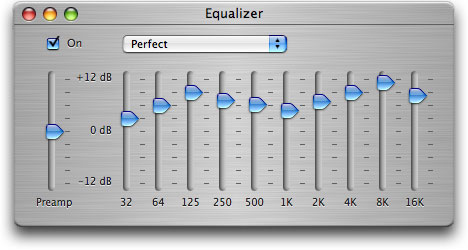 Open the equalizer, and from the pop-up menu, select “Make Preset.” Call it “Perfect,” because it is, and set the following levels, from left to right (skip the Preamp section):
db +3, +6, +9, +7, +6, +5, +7, +9, +11, +8 db
The image to the left (full-size image) shows about what it should look like when you’re done. Make sure you check the “On” box to activate the equalizer, too. These settings produce absolutely the best balance I’ve ever heard. My home computer speakers are ablaze with sound now.
I realize that there’s no such thing as a ‘perfect’ equalizer setting, hence the use of quotes in the title. I further realize that the use of any equalizer setting other than “flat” means that you’re no longer listening to the music as recorded on the master.
However, due to the varying quality of computer speakers, signal loss due to MP3/AAC encoding, and non-ideal speaker setups, you might find that your music does sound better to you using a non-flat equalizer setting. I’ve been using the above settings for a week or so now, and I must say that my music now sounds better — it may be less “true” to the original, but it sounds better to my admittedly untrained ear … and that’s what counts.
Let the flaming begin 😀
 News Source: MacFormat
I just got my 2000t and all of my songs are skipping in iTunes, and I cant figure out why. If someone could help me out and tell me how to fix this I would really appreciate it because its driving me crazy. Thanks for the replys.
You know I really appreciate this page, because I have messed with my equalizer so much and this solves my problem. This is the “PERFECT” setting. Thank You!
Can you only change EQ settings on Itunes, and not on the Ipod itself?
No, you can change EQ settings on the iPod itself but I'm not sure if you can set custom ones.
If you create your own settings on itunes, turn the ipod equalizer setting to off, and then synchronise, won't the ipod simply accept whatever itunes moves across?
I learn a lot from this blog. Will keep checking for more posts.